Pages

Tampilkan postingan dengan label free. Tampilkan semua postingan

Kamis, 01 November 2012


GameBoost sets the standard for PC gaming and internet optimization software. A combination of our two products GameGain and Throttle; GameBoost instantly increases the performance of your computer and squeezes out every last bit of performance your computer and internet connection is capable of. With many of the latest PC games requiring high hardware requirements to have a suitable gaming experience, it is important to optimize your computer's performance. Windows is a general operating system which is used for many tasks; it is not optimized for gaming. With GameBoost and a few clicks of your mouse, you will notice an increase in frames per second, smooth game play and less latency and lag during multiplayer gaming.

GameBoost makes several Windows registry and system changes to increase the performance of your current gaming hardware; this allows you to play the most recent games without having to spend hundreds of dollars to upgrade your hardware. These changes made to your computer improve memory usage, how foreground applications are prioritized with the CPU, hard drive access read and write speeds, how fast graphics can display on your screen, the overall speed of your internet connection and latency. GameBoost does not make changes, no patches and no modifications to games themselves, thus no anti-cheat detection software considers our software cheating software and you will not be banned from those gaming networks.


GameBoost also improves the speed of your internet connection; these system changes work with all internet connections such as Cable, DSL, U-Verse, Fios and dial-up. If you notice during multiplayer gaming that you are getting long pings and lag, GameBoost can help improve the speed of your connection. GameBoost makes several Windows registry changes to improve how networking packets are transmitted and received, we increase the buffer sizes which allows data to be transmitted and processed faster on your computer, allowing games, web browsing and downloading files to work much faster.

Optimizing your Windows environment to work faster with games is a no brainer if you are a hardcore PC video game enthusiast. Just like tuning a car to get higher performance, GameBoost tunes your PC's hardware to work faster which improves gaming and internet performance. Get every last bit of horsepower out of your computer to play your games smoother and faster while also increasing the speed of your internet with a few clicks of the mouse. Download a trial version of GameBoost today and unleash the full power of your computer hardware for faster gaming and internet.

1.siapin file yg mau di burn,video harus sudah di convert dalam format VOB.sama subtitle nya jg kl mau pake,formatnya srt kl bisa.
2.buka progi DvdLab Pro nya.pertama kali buka biasa muncul kaya gini :

- pilih 'simple movie only',itu kl misalnya mau bikin burn-an yg paling simple,jd pas di pasang di player langsung play movie nya,tanpa menu dan embel2 yg lain.
- pilih 'normal VTS Menu+movie',itu kl mau hasil burn-an yg kl di pasang di player ada pilihan menu nya.
kl udah...
3.masukin video nya yg pengen di burn ke dlm list,kaya di gambar caranya...

4.kl udah files video yg udah ada di list,di drag and drop aja ke kolom movie nya.kl mau bikin chapter dan gak mau repot,pilih aja 'auto chapter'.
untuk masukin subs,klik aja 'sub 1'..trus pilih impor,masukin deh file srt nya.


kl misalnya video yg pengen dimasukin lebih dr 1,di sebelah kiri ada pilihan movie,di klik kanan aja,add movie..trus langkah nya sama kaya sblm nya.
ingat untuk tidak melebihi batas disc space nya.kl lebih biasanya proses burn gagal.di sbelah kiri bawah ada pilihan DVD 5 dan DVD 9.pilih sesuai Disc yg digunakan.

5.kl udah smua pastiin 'connections'nya udah bener2 terkoneksi dgn benar,soalnya kl gak,film nya gak akan bs di pasang di player.tp tenang aja,biasanya nanti ketika di'compile' akan ketahuan ada yg error atau enggak,kl ada yg error,biasanya progi nya gak akan mau ke tahap selanjutnya.


6.kl udah smua,siap2 untuk di 'compile'..di line atas klik 'compile'

trus kluar pilihan baru kaya di gambar bawah,untuk output dan temporary folder nya bs di ganti kl mau,biar bs gampang nyarinya.kl bs di tempatkan di Disc yg berbeda untuk mempengaruhi proses compile agar lebih cepat.

kalo udah klik aja lngsung 'start'.
proses compile akan dimulai,tinggal nunggu sampai prosesnya selesai.
7.proses compile selesai,tinggal langsung di burn.
line di atas ada pilihan 'project',klik aja trus pilih 'burn'.

masukin deh disc kosong nya.

kl udah langsung aja pilih 'burn'
selesai.

moga2 aja jelas tutonya dan gak ada yg kelewat :D
kl ada yg kurang jelas monggo di tanya,nanti ta' usahain bantu :D

Note: untuk pengguna yg masih baru atau pertama kali pake,kalo bs di sediain aja Disc nya yg RW,biar kalo salah atau kurang memuaskan bisa di ulang.

:D HAPPY BURNING :D

Rabu, 31 Oktober 2012


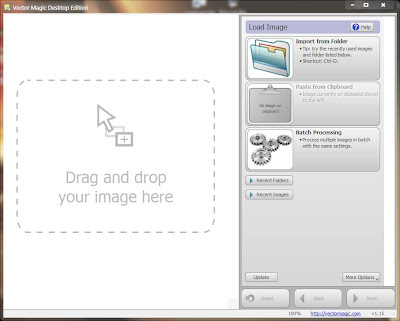
Program yg ngerubah foto jenis bitmap (pixel) ke dalam jenis vektor...

Feature:

  1. Fully automatic vectorization
  2. Easily Convert Bitmap Images To Clean Vector Art
  3. Basic vectorization mode, with easy-to-choose settings
  4. Advanced vectorization mode, with fine-grained control
  5. EPS, SVG and PDF vector output
  6. AI, DXF vector output
  7. EMF vector output
  8. PNG bitmap output
  9. JPG, TIF, GIF, BMP bitmap output
  10. Bitmap output, any zoom
  11. Powerful preview to inspect the result in detail
  12. Super-convenient drag-and-drop interface
  13. Vectorize very large images

Selasa, 30 Oktober 2012


Software Snapseed 1.2 | 24.8 MB

Snapseed is a new generation of photography software that inspires everyone to enjoy photography. High quality results are now fast, easy, and fun. Snapseed can be used to enhance, edit, email, and share photos via social networks in just a few seconds.
Key Features
• Tune Image—Quickly correct photos shot in difficult lighting situations, create depth and vibrancy with Ambience, or adjust White Balance, Saturation, Contrast and more
• Auto Correct—Automatically analyzes your photo and adjusts color and exposure, or you can use the sliders to add or reduce the enhancements
• Control Points—Make precise selections and enhancements in seconds with Nik Software’s revolutionary U Point technology
• Tilt-Shift—Creates a narrow in-focus area designed to simulate depth of field, common in a Miniature Scene look
• Details—Enhances details with traditional sharpening as well as Nik Software’s unique Structure control found in the professional Nik Software product line
• Crop & Straighten—Rotate or straighten with simple slider controls and select from a variety of standard aspect ratios while cropping

Senin, 29 Oktober 2012

Satu lagi software kecil tapi sangat inovatif yang pantas Anda coba. Clover versi 2.

Anda sudah pasti tidak terlepas dari penggunaan Windows Explorer di komputer/laptop Windows Anda, khususnya saat mengorganisir file dan folder, memindahkan, menyalin atau menghapus file-file. Penggunaan Windows Explorer sangatlah sering dan mudah. Namun, bagaimana jika kita membuat penggunaannya LEBIH MUDAH LAGI? Ada caranya!
Anda pernah menggunakan Google Chrome atau Mozilla Firefox? Tentu Anda pasti pernah melihat dan menggunakan fitur tab, yaitu untuk membuka beberapa halaman website dalam satu jendela browser.

Nah! Kita tambahkan fitur tab tersebut di Windows Explorer, agar kita bisa dengan mudah memindahkan atau menyalin file dari satu folder ke folder lainnya. Software Clover 2 akan membantu kita mewujudkannya. Cukup instal dan gunakan kemudahannya!

Buat teman-teman Anda iri, karena tidak semua komputer atau laptop memiliki fitur ini. :)
Perhatikan beberapa tampilannya di bawah ini (klik gambar untuk memperbesar):
Singkatnya, Clover adalah utilitas luar biasa yang membuat pengalaman browsing file menjadi benar-benar baru dan mudah. Software ini bekerja pada Windows XP, Windows Vista, Windows 7 dan Windows 8, di kedua edisi OS 32-bit dan 64-bit.

Free Download Software Clover 2: Tambahkan Tab Di Windows Explorer
sumber: anugrahberbagi

Minggu, 28 Oktober 2012

Software ini mampu memformat semua jenis SD memory card, SDHC memory card & SDXC memory card. SD Formatter menyediakan akses yg cepat dan mudah utk kapabilitas penuh terhadap memory card SD, SDHC dan SDXC.

Software SD Formatter mmg sengaja diciptakan khusus utk memory card yg berstandar SD/SDHC/SDXC. Sangat disarankan utk menggunakan tool SD Formatter ini sbg ganti utility format yg biasa ada pada OS yg digunakan utk bermacam tipe media storage. Karena dgn menggunakan utiliti utk memformat yg khusus akan memaksimalkan juga performasi memory card.


Memory card2 tipe SD/SDHC/SDXC umumnya memiliki "Protected Area" khusus dlm card sebagai fungsi security SD card-nya & tool SD Formatter tdk akan memformat "Protected Area" tsb.


System Requirement:

Operating Systems:

SD/SDHC:
Windows 7
Windows Vista
Windows XP

SDXC:
Windows 7
Windows Vista (SP1 or later)
Windows XP (SP2 or later) with the exFAT file system update (KB955704) 


N.B. Buat yg pake SDXC memory card, instal dulu driver SDXC-nya sebelum colok di slot SD-nya krn kalau tdk, SDXC card-nya tdk akan dikenali dan akan muncul pesan utk memformat di PC. Klo sdh sperti itu, JANGAN format dulu SDXC memory card krn data dlm SDXC card-nya akan terhapus dan file-system pasca format akan berubah ~ device SDXC tdk akan kompatibel.

SD Interface Device:

Berikut interface device yg bisa dipakai utk mengakses SD/SDHC/SDXC memory card:
- Slot SD komputer.
- USB SD reader.
- PC Card, CardBus atau ExpressCard SD adapter.

Pastikan utk selalu konfirmasi jika devicenya kompatibel dgn SD, SDHC atau SDXC memory card sebelum memformat.


CFosSpeed - Utility, which is a network driver, which attaches itself to existing Internet connection and optimizes data transfer by prioritizing traffic. Traffic Shaping - a method for optimizing the Internet traffic, providing the maximum speed with minimum delay. You can use cFosSpeed with a router and / or DSL-modem or cable modem. It is also possible to use with other types of Internet connections. cFosSpeed supports a wide variety of connections such as DSL, cable, ISDN, UMTS, and others.

cFos Traffic Shaping reduces delays during data transfer and allows you to surf the Internet up to three times faster. So that you can use all the speed of your connection!

During the data transfer using TCP / IP receiver sends back a special signal to acknowledge the receipt of data. New data is sent only when confirmation is received. Delay in confirmation of results in slower speeds, forcing the sender to wait. This is especially true of DSL and cable internet, where you downloaded the outgoing channel (which therefore has a small bandwidth) leads to slower download. This is because there are not enough outgoing velocity for confirming signals.

Standard solution to compensate for this effect was to increase the size of the TCP-window that allows you to send more data without immediate confirmation. The main problem here is the increase in ping (latency) and significant delays when rendering Web pages. A delay of up to two seconds is not uncommon for TCP-window size of 512KB. In short, the large size of TCP-window still will not let you get full speed downloads.

On the other hand, cFos Traffic Shaping arranges data by priority in the order that important packets are always earlier than usual. Thus, the evidence always come on time, and the transfer will never clog your connection!


Technology cFos Traffic-Shaping, recognizing the important types of bags and placing them in accordance with the priorities, not only smooths the Internet traffic, but also provides a low-ping. This not only accelerates surfing and download speed increases, but also offers advantages in online gaming.

Using cFos Traffic Shaping bring you tangible benefits such as:
The maximum download speed during the transfer
Stable low response time during the Internet-surfing or in other applications

cFosSpeed has two goals:
1.Sohranit low latency in the network (ping), to make Internet applications as responsive as possible.
2.Uluch**** throughput by removing bottlenecks in the network.

You can use cFosSpeed for Internet connections used only by you or used by multiple computers simultaneously.

Connections:
* Broadband: Cabel and DSL
* Narrow band: Modem and ISDN
* Mobile (UMTS, HSDPA, GSM, GPRS, HSCSD)
* Media:
o DSL, PPPoE
o DSL, PPPoA (Vcmux and LLC)
o DSL, PPTP
o VDSL
o Cable
o ISDN
o IP over AAL
o RFC1483/2684 bridged

Routing:
* Router and dial
* LAN and WLAN
* Modes Router and Bridge
* VPN
* Multiple connections simultaneously
* Adjustable routes
* Several IP adresses per adapter

Traffic Shaping (Traffic Shaping)
* Multi-user version
* TX and RX Shaping
* L7 Protocol Analysis
* Prioritization of Programs
* RTP / VoIP Detection
* 5 priority queues
* Individual rules with filter language

Options:
* Mode low latency
* Auto-MTU optimization

Extras:
* Resources (Budgets) Online
* Usage Graph
* Overview of connections
* Skins
* Firewall (Firewall)
* Data and packet logging
* 32-Bit and 64-Bit version
* 12 languages
What's new? cFosSpeed
---------------------------------------------------------------------------
Legend:
* New feature
+ Improvement
! Software change requires modification of your configuration
x Bugfix
- Information only

Revision history: ---------------------------------------------------------
cFosSpeed 8.03 build 1988

x Tried to fix a Windows 8 bluescreen with DPC_WATCHDOG_VIOLATION (0x133).
Thanks to kittler2 for the dump files. 

Sabtu, 27 Oktober 2012

Click image for larger version.   Name: dl.jpg  Views: 11  Size: 18.3 KB  ID: 51407


Desktop Lock is a computer security protection and access control software product, you can use it to lock computer to prevent people from accessing your private documents and resources. When the computer is locked by Desktop Lock, none can access your documents, browse your computer, or use programs on your computer.

You can lock your computer by one click, or let Desktop Lock to automatically lock your system at any time or when system becomes idle. You can customize the appearances of the locked desktop with the options provided by Desktop Lock. Desktop Lock also supports hotkey to lock the system.


  • Keep people off your computer.
    Once the computer is locked by Desktop Lock, the keyboard and mouse will be totally unavailable, none can use your computer or access your private data. People can not unlock the system without the correct unlock hotkey or unlock password, and can not terminated it with Task Manager. With its advanced features, it can keep locking even someone forced the system to be restarted.
  • Limit users to use only the program you specified.
    Desktop Lock can be configured to lock the system and launch a program or document, so that users can only use the specified program or document.
    It also supports Read-only mode, users can only view the launched program or document, can not operate it.
  • Customize appearances of locked desktop.
    With different lock modes, you can let Desktop Lock keep the current contents of the desktop, activate the current screensaver, or clear the desktop and show picture or video file.
    Your can customize the appearances of the locked desktop, such as background picture, banner etc, you also can let it play audio or video media on the locked desktop.


It's impossible for others to figure out how to unlock

Desktop Lock not only can be set an unlock password, it also supports various unlock methods, such as hotkey, mouse action etc. Only users inputted the correct hotkey or mouse action, the system then will pop up the unlock password dialog box (or unlock the system directly if there is no unlock password set to it).

Unlock hotkey
Unlock hotkey is NOT a common windows hotkey, it can be any string such as your nickname, birthday, or any other characters combination.
Mouse clicks
You can choose Left button click, Right button click or Both left and right button down, and specify a repeat count. For example: right-click 4 times.
Mouse moved
Unlock the system when mouse moved, as the screensavers do. This unlock method should be used with an unlock password.


A.P.E. pada dasarnya adalah bootable USB drive yang bisa digunakan untuk mengcopy file2 SAM dari dalam system Windows, menginstal backdoor, meng-crack password, mengedit file apapun yg diinginkan, dll. Semuanya bisa tanpa butuh password user! A.P.E. berbasis BartPE, tidak seperti BackTrack, A.P.E. didesain lebih utk membantu user menangani system Windows dengan lbh cepat dan mudah. A.P.E. juga dilengkapi network support jadi user bisa menggunakan FTP, atau protocol SSH utk mengirim file2 SAM tsb kemana saja.

Cara Menggunakan A.P.E.:

  1. Download A.P.E dan pasang USB drive.
  2. Jalankan file Ape_USB.exe - (SFX RAR File).
  3. (Klo tdk autorun) jalankan file APE_USB_MAKE.bat.
  4. (Opsional) Konfigurasikan Payload, atau Patch dalam tabel Rainbow Ophcrack.
  5. Selamat ber-prank-ria!!


N.B.:
Cara mem-patch Rainbow Table:
Dengan menggunakan program ISO editor favorit, patch table rainbow-nya kedlm attackpe.iso. File-nya otomatis dibikinkan dalam root USB drive agan setelah menjalankan file "APE_USB_MAKE.bat" atau "Ape_USB.exe". Ikutkan table-nya kedlm folder \ape\ophcrack_pe\tables\. Ingat! Patch table-nya setelah build .iso-nya klo tidak, ophcrack tdk akan bisa boot!

Free Download Software A.P.E. v0.8 - Beta 5:
Part 2
Password: .:n4Rc0:.

Jumat, 26 Oktober 2012

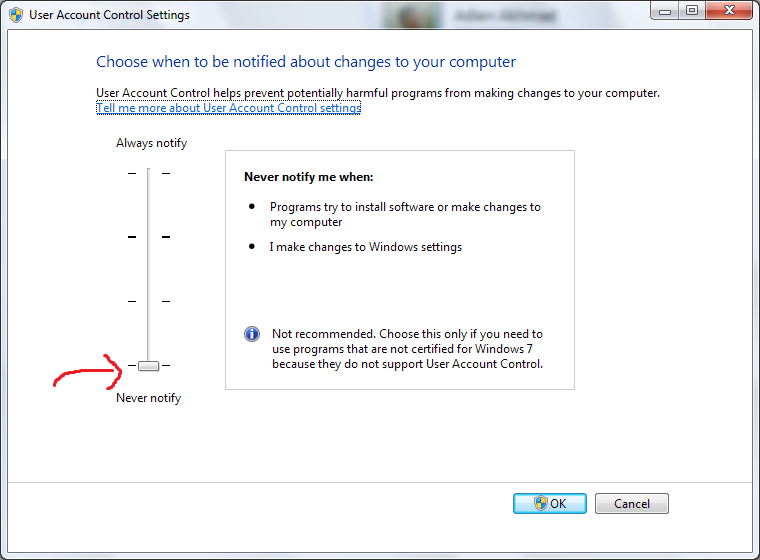
 Anda kesal terus terusan melihat ini ?

Jika ya, ada cara untuk menghentikan Windows 7 untuk berhenti “bertanya”.
  1. Buka Control Panel.
  2. Klik User Accounts.
  3. Pilih Change User Account Control Settings.
  4. Geser ke paling bawah (Never Notify).
  5. Klik OK, lalu restart.
Semoga Membantu,
sumber: utakatikkomputermu

Rabu, 24 Oktober 2012

Pada Windows 7 apabila kita membuka Windows Explorer, secara otomatis yang akan terbuka adalah folder Library, tapi bagaimana kalau kita ingin setiap kali Windows Explorer dibuka, folder yang langsung terbuka adalah folder pilihan kita? Berikut langkahnya..
  1. Klik Start Menu – Accesorries
  2. Klik kanan Windows Explorer, pilih Properties.
  3. Pilih tab Shortcut, perhatikan kolom target.
Secara default tertulis
%windir%\explorer.exe
Untuk merubah folder pertama yang dibuka kita harus menambahkan perintah
/n, /e, [Folder Tujuan]
Contoh : apabila kita menghendaki D:\My Data  yang akan dibuka maka akan jadi seperti ini
%windir%\explorer.exe /n, /e, D:\My Data
Selanjutnya tinggak klik OK. Selamat Mencoba, 

sumber: utakatikkomputermu

Selasa, 23 Oktober 2012

Cara ini menggunakan script batch, cukup copy paste kode dibawah ini kedalam notepad lalu save dengan extension .bat
net stop spooler
DEL %sysdir%\spool\printers\*.* /q
net start spooler
Cara kerja dari script ini adalah menyetop Print Spooler lalu membersihkan antrian Print lalu kemudian menjalankan kembali Print Spooler
Versi Langsung Jadi

sumber: utakatikkomputermu

Senin, 22 Oktober 2012

Copy paste kode dibawah ini kedalam notepad
cls
@ECHO OFF
title Sky-Lock
set username= terserah_agan
set password= terserah_agan
set foldername= nama_folder_agan
set cpanel= "Control Panel.{19FH2390-8AYA-1069-Y9DD-09002B10109D}"
if EXIST %cpanel% goto UNLOCK
if NOT EXIST %foldername% goto NEW_FOLDER
if exist %foldername% goto LOCK
:LOCK
echo
echo
echo
echo Welcome %username% !
echo Kunci %foldername% sekarang ?
pause
ren %foldername% %cpanel%
attrib +h +s %cpanel%
msg * %foldername% is now locked.
goto End
:UNLOCK
echo
echo
echo
echo Welcome !
echo Login dulu sebelum lanjut . . .
set/p "login=Username:"
if %login%== %username% goto USER_VALID
if NOT %login%== %username% goto USER_INVALID
:USER_VALID
set/p "bypass=Password:"
if NOT %bypass%== %password% goto VER_INVALID
echo .
echo .
echo .
echo Login Sukses !
pause
attrib -h -s %cpanel%
ren %cpanel% %foldername%
echo %foldername% sudah dibuka.
START %foldername%
goto End
:VER_INVALID
msg * ERROR : Password SALAH.
goto End
:NEW_FOLDER
md %foldername%
msg * %foldername% sudah dibuat.
goto End
:USER_INVALID
msg * ERROR : Username SALAH.
goto End
:End
lalu save dengan ekstensi .bat
bagian yang dapat diganti adalah
set username= terserah_agan
set password= terserah_agan
set foldername= nama_folder_agan

sumber: utakatikkomputermu

Minggu, 21 Oktober 2012

Ada baiknya apabila kita pisahkan junk files (file – file sampah) dari partisi Windows berada. Hal ini bertujuan untuk menjaga partisi Windows bersih dari file – file sampah sekaligus memudahkan kita untuk membersihkannya secara manual. Dalam artikel kali ini akan saya jelaskan bagaimana agar junk files tersebut disimpan dalam folder yang kita kehendaki, sebagai contoh akan saya gunakan direktori D:\Sampah sebagai tempat pengganti.
Secara default letak folder untuk menyimpan junk files ada di
C:\Windows\Temp
Nah berikut langkahnya :
  1. Klik kanan Computer/My Computer pada Windows Explorer, pilih properties.
  2. Kemudian klik advanced settings (Pengguna Windows XP skip langkah ini, langsung ke langkah 3).
  3. Pilih tab Advanced, kemudian klik Environment Variables (bagian bawah).
  4. Yang akan kita rubah hanya variable TEMP dan TMP, jangan merubah variable yang lain.
  5. Pada bagian User Variable anda akan melihat dua variable yaitu TEMP dan TMP, klik TEMP lalu klik Edit.
  6. Ganti Variable Value ke direktori yang anda kehendaki, sebagai contoh saya gunakan F:\Sampah (anda bisa gunakan yang lain).
  7. Ulangi langkah diatas pada variable TMP.
  8. Ulangi lagi langkah diatas pada dua variable TEMP dan TMP yang berada pada System Variable.
  9. Klik OK.
Selamat Mencoba, 

Tips : buatlah sebuah partisi kecil khusus untuk menampung Junk Files, 2 GB sudah sangat cukup.

sumber: utakatikkomputermu
Mau Install .Net Framework 4 tapi gagal terus. errornya seperti ini

Bagi teman teman yang mungkin kebetulan mempunyai masalah yang sama ini solusinya :


  1. buka Command Prompt, klik Start – run, lalu ketik cmd
  2. ketik perintah seperti berikut net stop WuAuServ, gunanya ialah mematikan Windows Update sementara
  3. kemudian ketikkan %windir% pada cmd, ini akan membuka tempat anda install Windows, dimana kebanyakan orang C:/Windows
  4. cari folder yang bernama SoftwareDistribution lalu rename menjadi SDold
  5. buka kembali cmd nya lalu ketikkan net start WuAuServ
Rupa rupanya masalahnya karena ada folder temporary dari Windows Update ada yang corrupted, makan solusinya adalah dengan merename nya.
Terbukti berhasil ketika saya coba, .Net Framework ter install tanpa masalah :)

sumber: utakatikkomputermu

Sabtu, 20 Oktober 2012

Teman teman yang menggunakan Windows 7 pasti ada yang merasa kesal karena setiap kali kita menghubungkan flashdisk, nama yang muncul adalah “Removable Storage” bukan nama yang sudah kita tentukan sebelumnya. Sekalipun kita rename sebanyak apapun nama yang muncul tetaplah “Removable Storage”. Bagaimana ini bisa terjadi?
Sebenernya hal ini muncul karena dalam flashdisk terdapat file tersembunyi dan terproteksi bernama “autorun.inf”. Masalah ini cenderung terjadi kepada mereka yang menggunakan Antivirus Lokal SMADAV karena SMADAV mengunci file ini. Masalah ini akan langsung terselesaikan apabila kita menghilangkan “autorun.inf”. Lalu bagaimana kita menghilangkannya?
Ikuti langkah berikut :
Untuk yang bukan pengguna SMADAV
  1. Pada Windows Explorer Klik Organize, lalu pilih Folder and Search Option.
  2. Klik tab View, kemudian pilih show hidden files, folders and drives dan hilangkan tanda centang pada Hide Protected Operating System Files. Klik OK.
  3. Sekarang Windows akan menampilkan semua file tersembunyi dan terproteksi.
  4. Carilah file “autorun.inf” pada flashdisk/harddisk anda kemudian delete file tersebut.
  5. Rename kembali flashdisk/harddisk anda.
  6. Kembalikan Setting ke Default pada Folder and Search Option.
Untuk Pengguna SMADAV.
  1. Buka jendela SMADAV anda.
  2. Pilih tab Tools, kemudian klik tab Smad-Lock.
  3. Disini anda bisa melihat semua drive yang terhubung pada komputer, pastikan status flashdisk anda “Unlocked”. Jika tidak klik flashdisk anda tersebut lalu klik Unlock.
  4. Cabut Flashdisk dan hubungkan kembali. Flashdisk anda seharusnya kembali ke nama yang anda berikan.
Selamat Mencoba, Semoga Membantu.
Catatan : Cara ini dapat digunakan pula untuk masalah yang terjadi pada harddisk.

sumber: utakatikkomputermu

Jumat, 19 Oktober 2012

Sebelum menggunakan Kamus Digital ini, install terlebih dahulu aplikasi WinDjvu. Bila belum punya, silahkan klik disini untuk mengunduhnya.

Free Download Kamus Al-Munawwir Digital DISINI


sumber: ma-tasikmalaya
Revo Uninstaller merupakan utilities software yang mempunyai fungsi seperti halnya YourUninstaller. Revo Uninstaller merupakan sebuah program yang dapat membantu sobat blogger untuk uninstall program-program yang sudah tidak di perlukan lagi. dan meremove file-file sampah yang memberatkan kinerja pc/laptop anda.


feature :

  • Auto Start Manager
  • Windows Tools Manager
  • Junk File Cleaner
  • Browsers History Cleaner
  • Office History Cleaner
  • Windows History Cleaner
  • Unrecoverable Delete Tool
  • Evidence Remover


Password : www.remo-xp.com

Rabu, 17 Oktober 2012

****

avast! Internet Security 7 (latest generation)
  1. The fastest antivirus for Windows (tested by AV-Comparatives.org)
  2. Certified antivirus with anti-spyware
  3. Online shopping and banking, with total privacy (SafeZone™)
  4. Worry-free web surfing and social networking
  5. Ability to clean your PC before Windows even starts

Cara Penggunaan Crack:
1. Install [Avast PRO] or [Avast Internet Security] as trail (DEMO)

2. Disable Self-Protection module from Avast.
You can re-enable it later.

3. XP users please double click [AVAST XP ZeNiX.reg] to activate my 2050.

4. Run [Avast 2050 by ZeNiX], and reboot.

5. Done

You can enable Avast's autoupdate with 2050.
You can re-enable Avast's Self-Protection module now.

Please always use your own license or DEMO license.

    Untuk kesekian kali nya IDM mengeluarkan versi terbaru nya yakni IDM 6.12 Build 22, fitur terbaru yang ada dalam IDM 6.12 build 22 ini adalah sudah support untuk firefox 18, silakan buat sobat yang ingin coba.


    what's new in version 6.12 Final Build 22 :
    (released :10/10/2012)
    • added support for firefox 18


    Password : www.remo-xp.com

    sumber: remo-xp
    Related Posts Plugin for WordPress, Blogger...
     
    Copyright (c) 2010 Art Chrome. Design by Wordpress Themes.

    Themes Lovers, Download Blogger Templates And Blogger Templates.